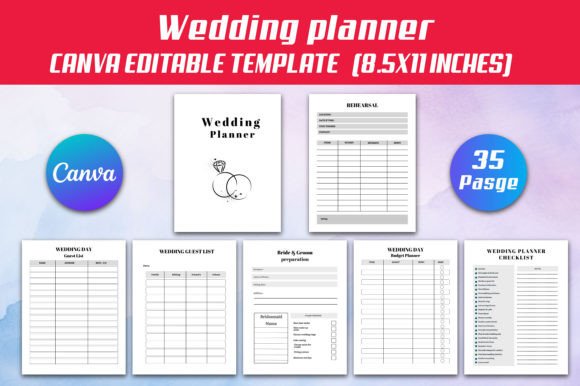
Wedding Planner Canva Interior
Planning a wedding shouldn’t mean juggling dozens of spreadsheets, sticky notes, and half-forgotten voice memos. The Wedding Planner Canva Interior is designed for real-life coordination—not theoretical perfection. It’s a thoughtfully structured, fully editable digital planner built inside Canva, so you’re not just downloading a static PDF—you’re getting access to a living, adaptable tool that responds to your evolving needs.
Whether you're organizing your own celebration, supporting a friend or family member, or offering planning services professionally, this interior gives you clarity without complexity. Its 35-page layout balances depth with usability: each section serves a clear purpose, from budget tracking to guest list management, rehearsal logistics to honeymoon prep—and even thoughtful extras like self-care challenges and skincare routines that acknowledge how emotionally and physically demanding wedding planning can be.
Why Editable Canva Access Changes the Game
Unlike rigid printable templates, the Wedding Planner Canva Interior lives in Canva—meaning you can personalize colors, fonts, shapes, and layout in seconds. Want to match your wedding palette? Swap out teal accents for dusty rose. Need to add a custom vendor category? Drag and drop a new text box. Prefer a minimalist look over decorative borders? Delete them instantly. This flexibility matters most when priorities shift—say, moving your ceremony indoors last-minute or switching venues mid-planning. With editable layers and grouped elements, changes stay clean and professional-looking, no design experience required.
That same Canva link also lets collaborators contribute meaningfully. A partner can update the groom’s prep checklist while you adjust the budget tracker. A bridesmaid can fill in contact details for flower girls and ring bearers without altering other sections. No version confusion, no emailing back-and-forth—just one shared, up-to-date source of truth.
Practical Tools That Prevent Overwhelm
The value isn’t in quantity—it’s in relevance. Take the WEDDING VENUES Comparison page: instead of vague columns, it prompts side-by-side evaluation across capacity, rain plan options, included furniture, and deposit terms—factors that actually impact decision-making. Or the Tracker EXPENSE sheet: it doesn’t just log costs—it groups line items by category (catering, attire, décor), calculates running totals, and flags overspending *before* final payments are due.
Even seemingly small features carry weight. The PREPARATION Sketch page includes blank space for hand-drawn floor plans or seating arrangements—ideal for visual thinkers who sketch ideas before committing to digital tools. The REHEARSAL section goes beyond timing—it outlines who leads each segment, where people stand, and what cues trigger transitions, helping avoid awkward pauses on the big day.
Designed for Real-World Output—Not Just Screen Use
You’ll receive high-resolution JPG and PNG files alongside a print-ready PDF—no bleed, 300 DPI, sized at 8.5 x 11 inches. That means whether you’re printing a single guest list for your venue coordinator or binding the full planner for daily use, colors stay sharp and text remains legible. And because it’s built for Amazon KDP, the margins and spine alignment meet platform requirements out of the box—no reformatting needed if you choose to publish or resell.
This dual-format approach supports different working styles: some users prefer flipping through physical pages with a pen; others rely on digital annotation during Zoom calls with vendors. Having both ensures continuity—if your laptop dies the night before a meeting, your printed timeline and contact lists are already in your bag.
Who Benefits Most—and When It Might Not Fit
This interior shines for couples managing their own planning, especially those balancing full-time jobs or remote work. Its structure reduces mental load: instead of remembering “what’s next?” the Wedding Planning Checklist and monthly schedule pages surface actionable steps based on your timeline. Freelance planners also find it useful as a client-facing framework—customize branding, add your logo, and deliver a polished, consistent experience across projects.
It’s less ideal for couples using comprehensive third-party platforms (like Zola or The Knot) that already include integrated guest management and RSVP tracking—unless you want a complementary offline backup or prefer handwriting notes during meetings. Likewise, if you need automated calculations (e.g., tax-inclusive totals or currency conversion), manual updates will still be necessary—but the clean layout makes those updates fast and error-resistant.
Beyond the Wedding: Built-In Support for Well-Being
What sets this planner apart is its recognition that wedding planning happens within a human life—not in isolation. Pages like the 30 Day Self-Care Challenge, Glowing Skin Challenge, and My Morning-to-Evening Skin Care Routine aren’t gimmicks. They’re gentle reminders to sustain energy and confidence amid stress. One bride used the self-care tracker to schedule short walks and hydration breaks—turning overwhelm into rhythm. Another groom referenced the skin care page while prepping for engagement photos, finding consistency more calming than any checklist.
Even the Thank you Product information page serves a quiet but vital role: it helps couples draft meaningful, personalized notes—not generic “thanks for coming” messages—by prompting reflections on specific moments or support received.
Getting Started Is Simpler Than You Think
After purchase, you’ll get immediate access to the editable Canva link, plus downloadable JPG, PNG, and PDF files. Open the Canva file, click “Make a Copy” to preserve the original, then begin customizing. Change colors in two clicks. Resize tables to fit longer vendor names. Hide sections you won’t use—or duplicate pages for parallel planning (e.g., two versions of the guest list: one for invites, one for day-of seating). Export your final version as a PDF for printing or sharing.
No subscriptions. No hidden fees. No learning curve beyond basic Canva navigation—which most users already know from social media graphics or presentations. And because every element is layered and labeled, even first-time editors can make confident adjustments.
The Wedding Planner Canva Interior doesn’t promise a flawless wedding—it offers something more reliable: grounded preparation, creative control, and space to breathe. When your timeline shifts, your budget tightens, or your energy dips, having a tool that adapts *with* you—not against you—makes all the difference.