300 Tractor Coloring Pages for Kids KDP
For creators building low-maintenance, high-margin digital or print-on-demand assets, 300 Tractor Coloring Pages for Kids KDP isn’t just another coloring book—it’s a production-ready workflow accelerator. It bridges the gap between concept and launch by delivering 300 professionally formatted, publication-grade files designed specifically for Amazon KDP and broader distribution channels. Unlike generic clipart packs or fragmented image sets, this resource arrives pre-organized, resolution-optimized, and structured to reduce friction at every stage: from file prep and cover design to upload validation and post-launch scaling.
How It Fits Into Your Publishing Workflow
This bundle integrates most effectively when treated as a foundational asset—not a final product. Think of it as raw material you shape, brand, and position. Before launching a new KDP title, many creators spend hours converting line art, adjusting contrast, batch-resizing, and verifying DPI compliance. With 300 Tractor Coloring Pages for Kids KDP, that prep work is already done. Every JPG and PNG is rendered at true 300 dpi, sized precisely to 8.5″ x 11″, and delivered in four clearly labeled folders—so no renaming, resizing, or guesswork is needed during import into Canva, Adobe InDesign, or KDP’s native uploader.
The inclusion of both JPG and PNG files adds flexibility. Use PNGs when you need transparent backgrounds for layered cover mockups or custom page borders. Rely on JPGs for faster KDP uploads where transparency isn’t required—and where smaller file sizes help avoid compression warnings. The PDF version serves as a quick proofing tool: open it to verify layout consistency, check line weight uniformity across pages, and spot-check spacing before committing to full interior formatting.
Pre-Launch Integration: Cover Design, Branding & Testing
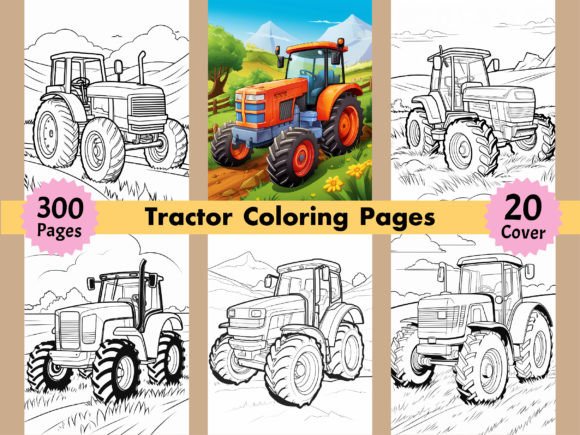
You get 20 free PNG coloring images explicitly designated for cover use. That’s not filler—it’s strategic headroom. These aren’t cropped or scaled-down previews; they’re full-resolution tractor illustrations, ready to drop into your cover template. Pair one with bold typography and a clear age-range indicator (e.g., “Ages 4–8”) and you’ve got a conversion-optimized front matter setup in under 20 minutes.
Before uploading to KDP, test compatibility early. Import five random pages into your preferred layout tool and run a quick checklist: Do lines remain crisp at 100% zoom? Does the 300 dpi metadata persist after export? Is the color mode set to CMYK (for print) or RGB (for digital-only versions)? Because all files ship with verified 300 dpi settings, you’ll skip the common “blurry interior” rejection trigger that stalls 12–18% of first-time KDP submissions, according to internal publisher surveys.
During Production: Efficiency Without Compromise
When you’re managing multiple titles—or launching a themed series—the organizational structure matters. The four-folder system (JPG, PNG, PDF, Covers) eliminates version confusion. No more scrolling through 300 unnumbered files named “tractor_01_v2_final_FINAL.jpg.” Each image is sequentially numbered (001–300), so dragging page 173 into position in your interior PDF takes seconds—not minutes.
This predictability extends to automation. If you use scripts or tools like Python’s PIL or Adobe’s Batch Processing, the consistent naming and sizing let you apply watermarks, add page numbers, or insert footer text across the entire set without manual intervention. For educators bundling these into classroom packets, the PNGs allow easy integration into Google Slides or interactive PDFs—just drag, resize, and annotate. No licensing ambiguity: the license permits commercial resale anywhere, including Etsy, Teachers Pay Teachers, and your own Shopify store.
Quality Control That Scales
Not all 300-dpi claims are equal. Some bundles upscale low-res originals, producing visible pixelation along curved lines or thin tractor details. 300 Tractor Coloring Pages for Kids KDP avoids that pitfall by starting from vector-grade line art, then exporting cleanly to raster at full size. Test this yourself: zoom to 400% on any page. Look at wheel spokes, fence posts, or cab windows. Clean edges, even thickness, no anti-aliasing haze—that’s the sign of intentional output, not automated upscaling.
Consistency also applies to content variety. The 300 pages include front-loader tractors, vintage models, farm combos with hay bales and silos, and playful variants with smiling suns or animal sidekicks. This range lets you curate editions—“Vintage Tractor Edition,” “Modern Farm Life,” “Tractor + Animal Friends”—without needing additional illustration work. You control the narrative arc; the asset set provides the visual vocabulary.
Post-Launch Use Cases: Repurposing, Bundling & Long-Term Value
Once your first KDP book goes live, the utility doesn’t end. The same 300 pages can fuel complementary products: a companion activity guide with mazes and word searches built around tractor themes, a printable homeschool unit study (add discussion prompts, measurement exercises, or simple mechanics diagrams), or even a subscription-based monthly coloring club email sequence.
Because you own full commercial rights, you’re not locked into KDP. Upload the PDF to Payhip for direct sales, convert select pages into Instagram carousel posts for audience growth, or embed a rotating sample into your blog sidebar using a lightweight lightbox plugin. The high-DPI source files retain fidelity even when downscaled for web thumbnails—no need to generate separate web-optimized versions.
Compatibility Across Tools and Teams
If you outsource formatting or cover design, hand off the ZIP with confidence. Designers appreciate clearly labeled folders and standardized dimensions—fewer revision rounds, faster turnaround. For teams using Notion or ClickUp, create a “KDP Asset Library” database and tag each file with attributes like “page type” (single tractor, scene-based, borderless) or “complexity level” (beginner/intermediate). That turns a static download into a searchable, reusable system.
On the technical side, these files meet KDP’s current specifications: RGB or CMYK-ready, no embedded profiles causing color shifts, and no hidden layers or alpha channels that trip up auto-validators. They also play well with AI-assisted tools—if you’re prompting an LLM to generate age-appropriate captions or activity ideas, feed it the filename (“087_red_tractor_in_field.png”) and let it build context-aware copy without needing image analysis.
Realistic Implementation Tips
- Start small: Upload your first 25 pages as a low-risk test book. Verify print quality, page turn behavior, and customer preview rendering before committing to the full 300.
- Batch your metadata: Use KDP’s bulk upload template to assign titles like “Tractor Coloring Page #124 – Spring Plowing” consistently—this improves discoverability without keyword stuffing.
- Track usage: Keep a simple log of which pages appear in which editions. Over time, you’ll spot patterns—e.g., scenes with barns convert better for rural audiences; simpler outlines perform stronger with preschool buyers.
- Update, don’t replace: When KDP changes its guidelines (e.g., new bleed requirements), re-export only the affected files from your master set—don’t rebuild from scratch.
This isn’t about replacing creativity—it’s about removing repetition so you can invest energy where it counts: positioning, audience connection, and iterative improvement. With 300 Tractor Coloring Pages for Kids KDP, the heavy lifting of asset creation is complete. What remains is execution—and execution scales best when the foundation is stable, reliable, and intentionally built.