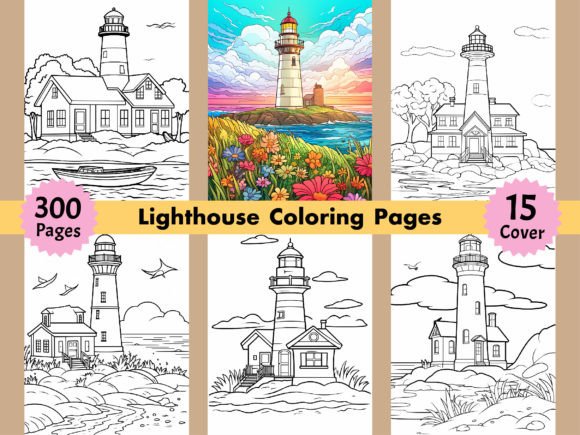
300 Beautiful Lighthouse Coloring Pages
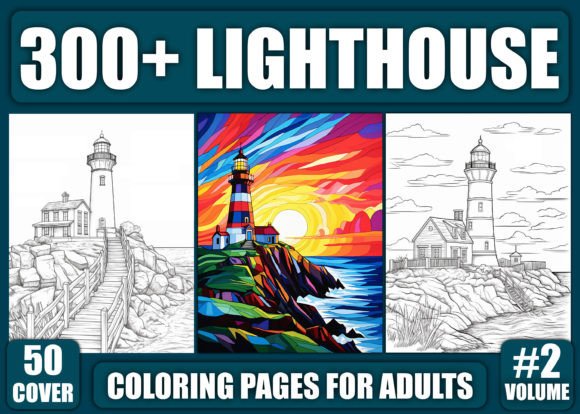
For creators building coloring books for adults—or anyone launching a low-overhead, high-utility creative product—300 Beautiful Lighthouse Coloring Pages delivers more than just line art. It’s a production-ready asset bundle designed to reduce friction at every stage: from design and formatting to publishing and branding. Unlike single-image packs or low-resolution downloads, this collection is structured with practical workflows in mind—especially for those using Kindle Direct Publishing (KDP), Etsy, or print-on-demand platforms.
Why Format Variety Matters More Than You Think
The inclusion of 300 JPG files, 300 PNG files, and one master PDF—all at 300 DPI and sized to 8.5″ x 11″—isn’t about redundancy. It’s about flexibility. JPGs render quickly for web previews and social media teasers. PNGs preserve transparent backgrounds, letting you layer lighthouse illustrations over custom textures, gradients, or branded watermarks—ideal for educators creating themed classroom handouts or marketers designing email newsletter graphics. The PDF serves as both a print-ready interior and a consistent reference for pagination, bleed checks, and KDP upload validation.
Having all three formats means you avoid time-consuming conversions—and the quality loss that often comes with them. For freelancers managing multiple client projects, that’s fewer hours spent troubleshooting rasterization errors or mismatched aspect ratios. For small business owners launching seasonal collections, it means faster turnaround between concept and storefront listing.
Real-Time Branding Without Extra Design Work
The 15 free PNG coloring images included for book covers address a common bottleneck: visual cohesion. Many creators spend hours sourcing fonts, adjusting contrast, or commissioning cover mockups—only to find their interior doesn’t match the tone. These 15 cover-ready images are drawn from the same stylistic family as the 300 interior pages: clean linework, balanced negative space, and architectural detail that reads clearly at thumbnail size. They’re not generic clipart—they’re intentional extensions of the collection’s aesthetic.
Use one as-is for a minimalist KDP cover. Layer it over a subtle nautical texture for an Etsy listing. Resize and recolor it for Instagram Story banners or Pinterest pins. Because they’re high-resolution PNGs, you retain full control over typography placement and background treatment—no pixelation, no upscaling artifacts.
KDP-Optimized, But Not KDP-Limited
While the set is explicitly formatted for KDP (300 pages, standard US letter size, print-safe resolution), its utility extends far beyond Amazon. Educators use individual lighthouse pages for mindfulness exercises in high-school art classes or senior center workshops—PNGs allow easy import into Canva or Google Slides. Bloggers embed single-page previews in “coloring challenge” posts, linking to their own store instead of third-party marketplaces. Freelance designers license select pages as part of larger illustration packs for clients in travel, coastal real estate, or boutique hospitality branding.
That said, it’s worth noting: this isn’t a customizable vector pack. If your workflow relies on editing individual anchor points or dynamically resizing elements without quality loss, SVG or AI files would serve better. But for users prioritizing speed, consistency, and broad compatibility—especially those working across devices or collaborating with non-designers—the 300 DPI raster suite strikes a pragmatic balance.
Who Benefits Most—and Why Timing Matters
Self-publishing authors preparing their third or fourth coloring book often hit diminishing returns on original illustration time. With 300 Beautiful Lighthouse Coloring Pages, they gain a cohesive volume in under a day—formatting, cover prep, and KDP preview testing included. That frees bandwidth to focus on audience engagement, series naming, or bundling strategies (e.g., pairing this with a companion journal or printable tracker).
Content creators running membership sites or Patreon tiers find value in the sheer volume: 300 unique pages support weekly releases over five months without repetition. The lighthouse theme also lends itself to narrative framing—“Lighthouses of the World,” “Coastal Guardians,” or “Signal & Stillness”—making each page feel intentional, not interchangeable.
Small print shops and local gift stores appreciate the ready-to-print PDF. No color correction needed. No scaling debates. Just load, proof, and bind. And because lighthouses resonate across age groups and interests—from maritime history buffs to anxiety-management practitioners—the collection has wider shelf appeal than highly niche themes.
A Thoughtful Fit, Not a One-Size Fix
This collection shines when used as a foundation—not a finish line. Its strength lies in reliability, not novelty. If your goal is ultra-modern, abstract, or culturally specific interpretations (e.g., Japanese lighthouses with ukiyo-e influence), you’ll likely supplement with custom art. Likewise, if accessibility is central to your project—such as adding alt-text descriptions or simplified versions for neurodiverse users—you’ll need to build those layers separately.
But for professionals who value clarity over complexity, consistency over customization, and output over over-engineering, 300 Beautiful Lighthouse Coloring Pages removes guesswork. It answers quiet but critical questions: Will this scale to print? Will my cover match my interior? Can I repurpose assets across platforms without re-exporting? Will buyers receive crisp, distraction-free line art?
Practical Next Steps—No Guesswork Required
Once downloaded, start with the folder structure: four clearly labeled directories (JPG, PNG, PDF, Cover Assets) mean zero time wasted hunting files. Open the PDF first to scan flow and pacing—notice how architectural detail builds gradually from simple silhouettes to intricate Fresnel lens renderings. That progression wasn’t accidental; it supports natural skill-building for colorists.
Then, pick one PNG cover image and test it in your preferred design tool. Drop in a title font, adjust spacing, export a 2480×3508 px version—and you’ve got a KDP-compliant cover in under ten minutes. Meanwhile, batch-upload the JPGs to your website gallery or drag the PDF straight into KDP’s interior uploader.
No plugins. No subscriptions. No waiting for approvals. Just 300 pages of purpose-built, technically sound lighthouse art—ready to support your goals, not define them.