200 Spring Scenes Coloring Pages for Kdp
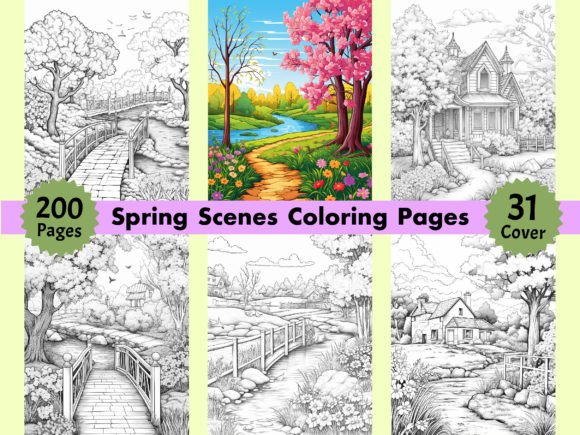
Coloring isn’t just a nostalgic pastime—it’s a functional tool in modern creative and business workflows. For creators building on Amazon KDP, educators designing seasonal learning materials, or marketers developing themed digital products, 200 Spring Scenes Coloring Pages for Kdp serves as a production-ready asset that bridges concept and execution. This collection isn’t about filling time; it’s about reducing friction in content creation, accelerating time-to-market, and maintaining visual consistency across multiple formats and audiences.
How It Fits Into Real Workflows
Whether you’re launching a spring-themed activity book for adults, assembling a bundle for Etsy or Gumroad, or preparing classroom resources for March through May, 200 Spring Scenes Coloring Pages for Kdp integrates cleanly at several workflow stages. Before launch, it eliminates the need to commission custom illustrations or spend hours editing low-resolution clipart. During production, its standardized 8.5″ x 11″ size and 300 DPI resolution mean no resizing, cropping, or quality loss when importing into Canva, Adobe InDesign, or Kindle Direct Publishing’s upload interface. After publication, the same files support rebranding—swap cover art, adjust interior layout, or repurpose individual pages into social media posts, email newsletter graphics, or printable planner inserts.
Four Folders, One Cohesive System
The structure—four separate folders containing JPG, PNG, PDF, and cover assets—is designed for interoperability, not just convenience. The JPGs are ideal for fast previews and lightweight web use. PNGs preserve transparent backgrounds, letting you layer spring motifs over custom gradients or branded templates without white-box artifacts. The PDF is print-optimized: single-page, bleed-free, and ready for KDP’s automated validation. And the 31 free book covers? They’re not filler—they’re strategic variants (pastel, botanical, minimalist, vintage-inspired) that let you A/B test thumbnails or target different sub-audiences without redesigning from scratch.
Compatibility Across Platforms and Roles
This collection works because it respects platform constraints and user intent. For KDP publishers, the 300 DPI resolution meets Amazon’s strict image guidelines—no rejection delays due to pixelation or incorrect dimensions. For educators using Google Classroom or Seesaw, the PNGs drop directly into assignment slides with crisp linework that prints cleanly on school printers. Freelance designers integrating coloring pages into client-branded wellness kits can extract SVG-like precision from the high-res JPGs using vector tracing tools—or simply drop them into Figma for quick mockups. Even bloggers embedding printable downloads in lead magnets benefit: the consistent sizing means one responsive CSS rule handles all 200 pages, and the clean line art scales well on mobile without blurring.
Preparation That Saves Time Later
Before importing any file, verify your workflow’s color mode and export settings. While these are RGB files (standard for screen and most home printing), commercial printers may request CMYK conversion—keep a backup folder for that adjustment if needed. Organize your local copy with clear naming: “SPRING_KDP_047_BOTANICAL_FLOWER_JPG”, for example. That discipline pays off when you’re updating only page 47 across three formats or tagging assets in Airtable or Notion for version control.
Also consider licensing scope early. These are AI-generated, but the output quality meets professional illustration standards—sharp edges, balanced negative space, and intentional composition. You retain full commercial rights for resale, bundling, and derivative work, so long as final products aren’t resold as standalone AI training data. That clarity lets you move confidently from draft to distribution without legal backtracking.
Efficiency Through Consistency
One of the strongest advantages of 200 Spring Scenes Coloring Pages for Kdp is its internal consistency—not uniformity. Each page features distinct spring motifs (cherry blossoms, nesting birds, rain boots, garden tools, baby animals, floral wreaths), yet they share proportional balance, line weight harmony, and spacing logic. That predictability means less visual editing per page. If you’re building a 12-week mindfulness journal, for instance, you can assign one coloring page per week without worrying about mismatched complexity levels or inconsistent margins disrupting the rhythm of the book.
For teams, this consistency also supports delegation. A virtual assistant can handle KDP metadata and interior formatting while you focus on marketing copy—or a designer can apply brand fonts and headers across all 200 pages knowing the underlying canvas won’t require individual tweaks.
Quality Control Without Extra Steps
Because every file is 300 DPI and sized to KDP’s standard, basic quality checks become automatic. Zoom in at 200% in Preview or Photoshop: lines remain sharp, no dithering or compression artifacts appear, and white backgrounds stay pure (critical for PNG transparency). Test-print one page on your default printer before batch-processing—this catches minor gamma shifts or ink saturation differences between screen and paper. Once confirmed, use batch processing tools like Adobe Bridge or XnConvert to apply uniform watermarks, add subtle borders, or convert all JPGs to WebP for faster website loading—all without manual iteration.
Long-Term Use and Scalability
Don’t treat this as a one-off download. Think of it as infrastructure. Save the original ZIP in a dedicated “Spring Assets” folder within your cloud archive, tagged with date and version number. When you expand into summer or fall collections later, having a known baseline—same DPI, same aspect ratio, same folder logic—means faster onboarding for new team members and smoother transitions between seasons.
You can also extend utility beyond coloring. Isolate elements using selection tools: turn a single tulip sketch into a bullet point for a presentation slide, extract a robin silhouette for an email header, or use the repeating vine pattern as a subtle background texture in a Canva template. The high resolution gives you room to crop tightly without losing fidelity—something low-DPI clipart rarely allows.
Practical Integration Tips
- For KDP Launches: Upload the PDF first to confirm KDP’s auto-preview renders correctly. Then replace individual pages with JPGs if you need custom headers or page numbers.
- For Educators: Combine 5–10 pages into a single PDF handout using Preview or Acrobat. Add typed reflection prompts on blank half-pages to create hybrid learning sheets.
- For Marketers: Use PNGs in Mailchimp or Klaviyo campaigns—pair each coloring page with a short seasonal tip (“Color this daffodil while planning your spring garden”) to boost engagement.
- For Freelancers: Include one complimentary coloring page in your proposal deck as a visual sample—clients instantly grasp style, detail level, and thematic range.
What makes 200 Spring Scenes Coloring Pages for Kdp durable isn’t just quantity—it’s how thoughtfully the assets align with real-world constraints: platform requirements, team handoffs, revision cycles, and audience expectations. It doesn’t replace strategy or voice—but it removes one layer of execution risk, letting you invest energy where it matters most: messaging, positioning, and meaningful connection.